Surfaces vs modals vs intents vs events
The SDK gives you four ways for apps to work together. They are easy to confuse because several can solve the same problem badly. Here is what each is for.
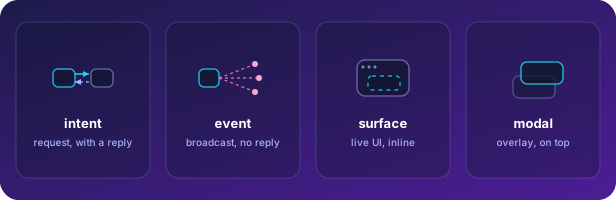
The four primitives
Section titled “The four primitives”- Intent — a named, versioned capability call. One app asks another to do something or return
something (
invoke), and the provider answers (provide). Request/response, point-to-point via the shell. Reach for this when you need data or an action from another app and you want a result back. - Event — a fire-and-forget broadcast on a topic (
publish/subscribe). No response, no caller. The platform’s ownsession.changedandtheme.changedare events. Reach for this when something happened and any number of apps might care, but you do not need an answer. - Surface — live UI from another app, embedded inline in yours. The other app renders it; you host it. Reach for this when you want to show another app’s view in place — an invoice list inside a customer record — not just its data.
- Modal — a surface used as a top-level overlay. The shell owns the frame; the body is one of your own surfaces. Reach for this when you need a focused, above-everything interaction (an edit form, a confirm) that should float over all chrome.
A quick decision
Section titled “A quick decision”| You want… | Use | Get a result? | Whose UI? |
|---|---|---|---|
| data or an action from another app | intent | yes | none (data) |
| to announce something happened | event | no | none |
| to embed another app’s view inline | surface | n/a | the provider’s |
| a focused overlay of your own UI | modal | yes (on close) | your own |
Common mistakes
Section titled “Common mistakes”- Using an event when you need an answer. Events have no response channel. If you need a result, it is an intent.
- Using an intent to move UI. Intents move data and actions, not rendered views. If you find yourself shipping HTML through an intent payload, you wanted a surface.
- Building your own overlay instead of a modal. A modal stacks above all platform chrome and the shell owns its escape and sizing; an in-app overlay inside your iframe cannot escape your frame.